As of the previous article, the game can be considered to be in a “complete” state, but I want to add a few features, such as a title screen, some options such as score to win, ball speed, and game colors. I also want to add a link back to the title screen from the winner screen, so this will entail some logic for navigation between pages. Here is the previous article in the series:
JavaScript: Intro to Web Game Development – Part 6: add win screen and replay
Here is what the game’s title screen with options looks like:
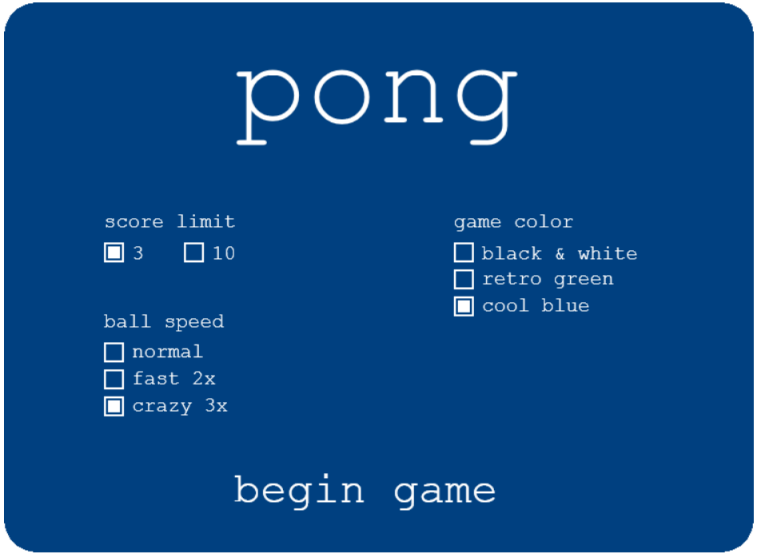
Here are the coding steps to make all of these new features work:
Step 1: Add some new global variables
var GAME_COLOR = "black"; // default
var startNewGame = false;
var mouseClickX, mouseClickY;
var mouseClicked = false;
var box_1_selected = true; // default
var box_2_selected = false;
var box_3_selected = true; // default
var box_4_selected = false;
var box_5_selected = false;
var box_6_selected = true; // default
var box_7_selected = false;
var box_8_selected = false;
var linkText, linkText2;
var link1, link2;
var linkX2, linkY2;
var mousePosition = {x:0, y:0}
var mousePos;
Step 2: Update the game loop in the window.onload function
    // game loop - begin ------------
    var framesPerSecond = 30;
    setInterval(
        function() {

            if (startNewGame == true) {
                startGame();
            } else if (showGameOverScreen) {
                gameOverScreen();
            } else {
                titlePage();
            }

        }, 1000/framesPerSecond);
    // game loop - end  ------------
Notice the new function calls to startGame() and titlePage(). The startGame() function looks like this:
function startGame() {
    ballMovement();
    drawComponents();
}
Step 3: Enhance mousedown event listener in the window.onload function
    canvas.addEventListener('mousedown',
    function(evt) {
        mousePos = calculateMousePos(evt);
        mouseClickX = mousePos.x;
        mouseClickY = mousePos.y;
        // console.log(mousePos);
        // console.log("mouseClickX: ", mouseClickX, "mouseClickY: ", mouseClickY);
        mouseClicked = true;
    });
mouseClickX and mouseClickY are new variables that will help with determining if a button or link is clicked.
Step 4: Create new function for detecting button and link clicks
function isPointInsideRect(pointX, pointY, rectX, rectY, rectWidth, rectHeight) {
    // returns true if point is inside rect
    return  (rectX <= pointX) &&
            (rectX + rectWidth >= pointX) &&
            (rectY <= pointY) &&
            (rectY + rectHeight >= pointY);
}
This function will return true if a mouse click is within the rectangle of a button or link. Otherwise it will return false.
Step 5: Move the code for drawing the scores into it’s own function
function drawScores() {
    // Left side score - make room for more digits
    canvasContext.font="40px monospace";
    if (player1Score < 10) {
        canvasContext.fillText(player1Score, (canvas_width/2)-60, 40);
    } else if (player1Score > 99) {
        canvasContext.fillText(player1Score, (canvas_width/2)-100, 40);
    } else {
        canvasContext.fillText(player1Score, (canvas_width/2)-80, 40);
    }

    // Right side score
    canvasContext.fillText(player2Score, (canvas_width/2)+35, 40);
}
Step 6: Update the gameOverScreen() function
The winner screen has been updated with the following:
- [settings] has been added to the bottom of both the left and right pages
- both the play again and [settings] text now act as links that change the pointer when the mouse hovers over them
- code has been added to make the mouseover code work
- boxes have been created to make clicking on the the text links detectable
- actions have been defined for when a link has been clicked
Here is an example of what the new winner screens look like. Both the “play again” and “[settings]” text are now links that change the pointer on hover and have specific actions when clicked. I also made sure the score and net were left on the screen.
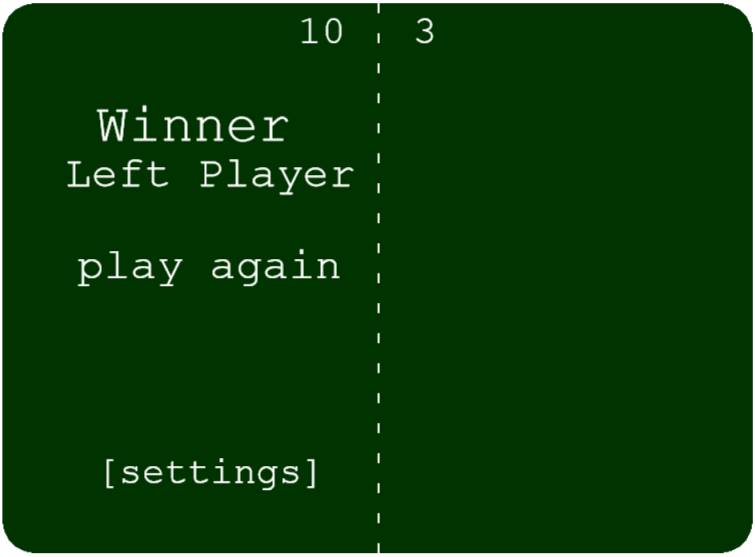
Here is what the new gameOverScreen() looks like:
function gameOverScreen() {

    canvasContext.fillStyle = 'white';
    drawScores();
    drawNet();

    if(player1Score >= WINNING_SCORE) {

        canvasContext.font="54px monospace";
        canvasContext.fillText("Winner", canvas_width/8, canvas_height/4);
        canvasContext.font="44px monospace";
        canvasContext.fillText("Left Player", canvas_width/12, canvas_height/3);

        linkText = "begin game";
        linkX = (canvas_width/10);
        linkY = canvas_height/2;
        boxY = (canvas_height/2)- 50;
        var link1 = {x:65, y:235, width:280, height:60};
        // canvasContext.fillStyle = 'gray';
        // canvasContext.fillRect(link1.x, link1.y, link1.width, link1.height);
        canvasContext.fillStyle = 'white';
        canvasContext.fillText("play again", linkX, linkY);


        // options link
        canvasContext.font="38px monospace";
        linkText2 = "[settings]";
        linkX2 = canvas_width/8;
        linkY2 = canvas_height-70;
        var link2 = {x:90, y:445, width:235, height:55};
        // canvasContext.fillStyle = 'gray';
        // canvasContext.fillRect(link2.x, link2.y, link2.width, link2.height);
        canvasContext.fillStyle = 'white';
        canvasContext.fillText(linkText2, linkX2, linkY2);


    } else if(player2Score >= WINNING_SCORE) {
        canvasContext.font="54px monospace";
        canvasContext.fillText("Winner", (canvas_width/2 + canvas_width/8), (0 + canvas_height/4));
        canvasContext.font="44px monospace";
        canvasContext.fillText("Right Player", (canvas_width/2 + canvas_width/24), (0 + canvas_height/3));

        linkX = (canvas_width/2 + canvas_width/16);
        linkY = canvas_height/2;
        var link1 = {x:415, y:235, width:280, height:60};
        // canvasContext.fillStyle = 'gray';
        // canvasContext.fillRect(link1.x, link1.y, link1.width, link1.height);
        canvasContext.fillStyle = 'white';
        canvasContext.fillText("play again", linkX, linkY);


        // options link
        canvasContext.font="38px monospace";

        linkText2 = "[settings]";
        linkX2 = (canvas_width/2 + canvas_width/12);
        linkY2 = canvas_height-70;
        var link2 = {x:435, y:445, width:235, height:55};
        // canvasContext.fillStyle = 'gray';
        // canvasContext.fillRect(link2.x, link2.y, link2.width, link2.height);
        canvasContext.fillStyle = 'white';
        canvasContext.fillText(linkText2, linkX2, linkY2);

    }
    var x = mousePosition.x;
    var y = mousePosition.y;

    onlink2 = isPointInsideRect(x, y, link1.x, link1.y, link1.width, link1.height);
    onlink3 = isPointInsideRect(x, y, link2.x, link2.y, link2.width, link2.height);
    if (onlink2 == true || onlink3 == true) {
        document.body.style.cursor = "pointer";
    } else {
        document.body.style.cursor = "";
    }

    if (mouseClicked) {
        link1_clicked = isPointInsideRect(mouseClickX, mouseClickY, link1.x, link1.y, link1.width, link1.height);
        if (link1_clicked == true) {
            link1_selected = true;
            link2_selected = false;
            startNewGame = true;
            player1Score = 0;
            player2Score = 0;
            showGameOverScreen = false;
            document.body.style.cursor = "";
            startGame();
        }

        link2_clicked = isPointInsideRect(mouseClickX, mouseClickY, link2.x, link2.y, link2.width, link2.height);
        if (link2_clicked == true) {
            link1_selected = false;
            link2_selected = true;
            startNewGame = false;
            player1Score = 0;
            player2Score = 0;
            showGameOverScreen = false;
            box_1_selected = true;
            mouseClicked = false;
            titlePage();
        }

    }
    // reset to false so that the mouse click only registers once in the game loop
    mouseClicked = false;
}
Step 7: Update the computer paddle A.I. for the new ball speeds
Since there are now two new options for ball speeds (2x and 3x), I decided to update the computer A.I. so that the game will be a little more challenging. (Otherwise the computer would almost certainly always lose.)
function computerPaddleAI() {
    var paddle2YCenter = paddle2Y + (PADDLE_HEIGHT/2);

    var normal = 6;
    var fast = 10; // just a little less than 2x
    var crazy = 16;
    var moveSpeed;

    if (ballSpeedX == 20 ){
        moveSpeed = fast;
    } else if (ballSpeedX > 20 ){
        moveSpeed = crazy;
    } else {
        moveSpeed = normal
    }

    if(paddle2YCenter < ballY - 35) {
	paddle2Y = paddle2Y + moveSpeed;
    } else if(paddle2YCenter > ballY + 35) {
	paddle2Y = paddle2Y - moveSpeed;
    }
}
Step 8: Create the titlePage() function
function titlePage() {

    if(showGameOverScreen) {
        return;
    }

    // clear the game screen
    canvasContext.fillStyle = GAME_COLOR;
    canvasContext.roundRect(0, 0, canvas_width, canvas_height, 40, GAME_COLOR, 0);

    // draw the pong title
    canvasContext.fillStyle = 'white';
    canvasContext.font="120px monospace";
    canvasContext.fillText("pong", 230, 120);

    //draw the begin game link
    canvasContext.font="44px monospace";
    linkText = "begin game";
    linkX = 230;
    linkY = 500;
    var begin_game_link = {x:210, y:455, width:300, height:60};
    // A gray box around the text link for debugging
    // canvasContext.fillStyle = 'gray';
    // canvasContext.fillRect(begin_game_link.x, begin_game_link.y, begin_game_link.width, begin_game_link.height);
    canvasContext.fillStyle = 'white';
    canvasContext.fillText(linkText, linkX, linkY);


    // ---- Game options ----

    // ----------------------- Score limit ----------------------- //
    canvasContext.fillStyle = 'white';
    canvasContext.font="20px monospace";
    canvasContext.fillText("score limit", 100, 225);
    var bt = 28; // distance text is to the right of the box

    // box 1
    var box1 = {x:100, y:240, width:20, height:20};
    canvasContext.fillText("3", box1.x + bt, 257);
    canvasContext.fillRect(box1.x, box1.y, box1.width, box1.height);
    canvasContext.fillStyle = GAME_COLOR;
    canvasContext.fillRect(102, 242, 16, 16);

    if (box_1_selected == true) {
        canvasContext.fillStyle = 'white';
        canvasContext.fillRect(104, 244, 12, 12);
    }

    // box 2
    var box2 = {x:180, y:240, width:20, height:20};
    canvasContext.fillStyle = 'white';
    canvasContext.fillText("10", box2.x + bt, 257);
    canvasContext.fillRect(box2.x, box2.y, box2.width, box2.height);
    canvasContext.fillStyle = GAME_COLOR;
    canvasContext.fillRect(182, 242, 16, 16);

    // box 2 selected
    if (box_2_selected == true) {
        canvasContext.fillStyle = 'white';
        canvasContext.fillRect(184, 244, 12, 12);
    }

    // ----------------------- color options ----------------------- //
    canvasContext.fillStyle = 'white';
    canvasContext.font="20px monospace";
    canvasContext.fillText("game color", 450, 225);

    // box 3
    var box3 = {x:450, y:240, width:20, height:20};
    canvasContext.fillText("black & white", box3.x + bt, 257);
    canvasContext.fillRect(box3.x, box3.y, box3.width, box3.height);
    canvasContext.fillStyle = GAME_COLOR;
    canvasContext.fillRect(452, 242, 16, 16);

    if (box_3_selected == true) {
        canvasContext.fillStyle = 'white';
        canvasContext.fillRect(454, 244, 12, 12);
    }

    // box 4
    var box4 = {x:450, y:267, width:20, height:20};
    canvasContext.fillStyle = 'white';
    canvasContext.fillText("retro green", box4.x + bt, 282);
    canvasContext.fillRect(box4.x, box4.y, box4.width, box4.height);
    canvasContext.fillStyle = GAME_COLOR;
    canvasContext.fillRect(452, 269, 16, 16);

    // box 4 selected
    if (box_4_selected == true) {
        canvasContext.fillStyle = 'white';
        canvasContext.fillRect(454, 271, 12, 12);
    }

    // box 5
    var box5 = {x:450, y:294, width:20, height:20};
    canvasContext.fillStyle = 'white';
    canvasContext.fillText("cool blue", box5.x + bt, 309);
    canvasContext.fillRect(box5.x, box5.y, box5.width, box5.height);
    canvasContext.fillStyle = GAME_COLOR;
    canvasContext.fillRect(452, 296, 16, 16);

    // box 5 selected
    if (box_5_selected == true) {
        canvasContext.fillStyle = 'white';
        canvasContext.fillRect(454, 298, 12, 12);
    }

    // ----------------------- ball speed ----------------------- //
    canvasContext.fillStyle = 'white';
    canvasContext.font="20px monospace";
    canvasContext.fillText("ball speed", 100, 325);

    // box 6
    var box6 = {x:100, y:340, width:20, height:20};
    canvasContext.fillText("normal", box6.x + bt, 355);
    canvasContext.fillRect(box6.x, box6.y, box6.width, box6.height);
    canvasContext.fillStyle = GAME_COLOR;
    canvasContext.fillRect(102, 342, 16, 16);

    if (box_6_selected == true) {
        canvasContext.fillStyle = 'white';
        canvasContext.fillRect(104, 344, 12, 12);
    }

    // box 7
    var box7 = {x:100, y:367, width:20, height:20};
    canvasContext.fillStyle = 'white';
    canvasContext.fillText("fast 2x", box7.x + bt, 382);
    canvasContext.fillRect(box7.x, box7.y, box7.width, box7.height);
    canvasContext.fillStyle = GAME_COLOR;
    canvasContext.fillRect(102, 369, 16, 16);

    // box 7 selected
    if (box_7_selected == true) {
        canvasContext.fillStyle = 'white';
        canvasContext.fillRect(104, 371, 12, 12);
    }

    // box 8
    var box8 = {x:100, y:394, width:20, height:20};
    canvasContext.fillStyle = 'white';
    canvasContext.fillText("crazy 3x", box8.x + bt, 409);
    canvasContext.fillRect(box8.x, box8.y, box8.width, box8.height);
    canvasContext.fillStyle = GAME_COLOR;
    canvasContext.fillRect(102, 396, 16, 16);

    // box 7 selected
    if (box_8_selected == true) {
        canvasContext.fillStyle = 'white';
        canvasContext.fillRect(104, 398, 12, 12);
    }

    // check to see if the mouse is over the begin game link
    // if so, change the pointer to a hand, indicating a link
    var x = mousePosition.x;
    var y = mousePosition.y;

    onlink1 = isPointInsideRect(x, y, begin_game_link.x, begin_game_link.y, begin_game_link.width, begin_game_link.height);
    if (onlink1) {
        document.body.style.cursor = "pointer";
    } else {
        document.body.style.cursor = "";
    }

    // handle the case of a mouse click
    if (mouseClicked) {
        // check to see if the mouse clicked box1
        box_1_clicked = isPointInsideRect(mouseClickX, mouseClickY, box1.x, box1.y, box1.width, box1.height);
        if (box_1_clicked == true) {
            box_1_selected = true;
            box_2_selected = false;
            WINNING_SCORE = 3;
        }
        // check to see if the mouse clicked box 2
        box_2_clicked = isPointInsideRect(mouseClickX, mouseClickY, box2.x, box2.y, box2.width, box2.height);
        if (box_2_clicked == true) {
            box_1_selected = false;
            box_2_selected = true;
            WINNING_SCORE = 10;
        }

        // check to see if the mouse clicked box 3
        box_3_clicked = isPointInsideRect(mouseClickX, mouseClickY, box3.x, box3.y, box3.width, box3.height);
        if (box_3_clicked == true) {
            box_3_selected = true;
            box_4_selected = false;
            box_5_selected = false;
            GAME_COLOR = "black";
        }

        // check to see if the mouse clicked box 4
        box_4_clicked = isPointInsideRect(mouseClickX, mouseClickY, box4.x, box4.y, box4.width, box4.height);
        if (box_4_clicked == true) {
            box_3_selected = false;
            box_4_selected = true;
            box_5_selected = false;
            GAME_COLOR = "#003300";
        }

        // check to see if the mouse clicked box 5
        box_5_clicked = isPointInsideRect(mouseClickX, mouseClickY, box5.x, box5.y, box5.width, box5.height);
        if (box_5_clicked == true) {
            box_3_selected = false;
            box_4_selected = false;
            box_5_selected = true;
            GAME_COLOR = "#004080";
        }

        // check to see if the mouse clicked box 6
        box_6_clicked = isPointInsideRect(mouseClickX, mouseClickY, box6.x, box6.y, box6.width, box6.height);
        if (box_6_clicked == true) {
            box_6_selected = true;
            box_7_selected = false;
            box_8_selected = false;
            ballSpeedX = 10;
            ballSpeedY = 4;
        }

        // check to see if the mouse clicked box 7
        box_7_clicked = isPointInsideRect(mouseClickX, mouseClickY, box7.x, box7.y, box7.width, box7.height);
        if (box_7_clicked == true) {
            box_6_selected = false;
            box_7_selected = true;
            box_8_selected = false;
            ballSpeedX = 20;
            ballSpeedY = 8;
        }

        // check to see if the mouse clicked box 8
        box_8_clicked = isPointInsideRect(mouseClickX, mouseClickY, box8.x, box8.y, box8.width, box8.height);
        if (box_8_clicked == true) {
            box_6_selected = false;
            box_7_selected = false;
            box_8_selected = true;
            ballSpeedX = 30;
            ballSpeedY = 12;
        }

        // check to see if the mouse clicked the begin game link
        begin_game_link_clicked = isPointInsideRect(mouseClickX, mouseClickY, begin_game_link.x, begin_game_link.y, begin_game_link.width, begin_game_link.height);
        if (begin_game_link_clicked == true) {
            box_1_selected = false;
            box_2_selected = false;
            startNewGame = true;
            player1Score = 0;
            player2Score = 0;
            showGameOverScreen = false;
            document.body.style.cursor = "";
            startGame();
        }

    }
    // reset to false so that the mouse click only registers once in the game loop
    mouseClicked = false;

}
Notice that each box is defined as an object with x, y, width, height:
var box8 = {x:100, y:394, width:20, height:20};
And then the isPointInsideRect() function is used in conjunction with mouse click coordinates to determine if a box has been clicked:
box_8_clicked = isPointInsideRect(mouseClickX, mouseClickY, box8.x, box8.y, box8.width, box8.height);
At this point, the game is essentially complete. The only other things I can think of to add are sound effects and perhaps options for changing the computer AI player from the right to the left and maybe adding a two player option that uses keyboard arrows.
Here is the game as it stands at this point: